Installation instructions
Back to topThreadle CLI
Threadle CLI (with Threadle.Core included) is distributed as a single self-contained executable, so no special .NET runtime dependencies are required. This is what is needed to work with Threadle directly, and to work with it from threadleR, so this is what most users would get. If you are using Windows, the easiest is to get an installation/setup file.
- Obtain Threadle for your platform, either by...
- Downloading an appropriate binary for your platform from the Download page, following the instructions there, or
- Compile your own binary from the source code and INSTALL instructions available on the GitHub repository
- Place the executable in a directory of your choice. If having downloaded and installed a Setup Installer for Windows and kept the 'Set PATH' option checked, Threadle should be available anywhere on your system.
- Verify the download
- Verification of code signature (Windows): Right-click the executable, choose Properties/Digital Signatures. The binary is signed with an Extended Validation (EV) certificate issued to Linköping University.
- Verification of SHA256 checksum (all): Verify that the binary you downloaded has the same SHA256 checksum as the one provided on the Download page.
threadleR (R library)
threadleR is an R package that makes it possible to work with Threadle from R, using a set of threadleR functions that wraps around the underlying Threadle CLI commands. To use threadleR, you must have a working Threadle CLI executable on your system.
Before you can use threadleR, you first have to install the threadleR package into your R environment. As the threadleR package is on github, you can easily install it from there, directly from your R environment, using the following R code:
# Option 1 (recommended)
# First, install the 'remotes' package if you don't have it.
# This makes it possible to install packages from github (where threadleR is).
# Uncomment the next line to install the 'remotes' package:
# install.packages("remotes")
# And then use this to install it from the threadleR repository:
remotes::install_github("YukunJiao/threadleR")
Also check the threadleR docs here: https://github.com/YukunJiao/threadleR
Back to topModules: Core, CLIconsole, threadleR
Back to topThreadle is organized into three modules:
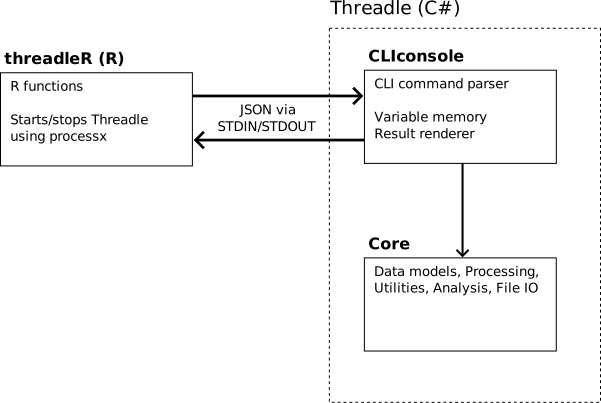
Threadle.Core
Threadle.Core is the core library containing all data structures and logic:
- Model - Data structures for Nodesets, Networks, 1-mode and 2-mode relational layers, edgesets, hyperedges, and node attributes.
- Analysis - Analytical functions (proof-of-concept): degree centrality, density, shortest path, connected components, and attribute summaries.
- Processing - Network transformation operations: symmetrize, dichotomize, filter, subnet creation, and random network generation.
- Utilities - File I/O (serialization in text and binary formats), layer import/export, and helper functions.
Core can also be used independently, included as a DLL or embedded as a project reference in an existing C# solution. This allows developers to integrate Threadle's data structures and methods directly into custom applications without the CLI layer. See the GitHub repository for project structure and build instructions.
Threadle.CLIconsole
Threadle.CLIconsole is a CLI-based frontend that runs on top of Core. It provides an interactive command language for creating, querying and manipulating network data. CLIconsole parses user commands (in text or JSON format), translates them into method calls in Core, and renders results back to the user.
CLIconsole maintains its own variable space where created Nodesets and Networks are stored for the duration of the session. These variables are references by name in subsequent commands. The data structures themselves are managed by Core; CLIconsole simply holds references to instances of them.
For most users, CLIconsole (with Core) is the primary deliverable: this is what the pre-compiled binaries provide, and what threadleR communicates with.
threadleR
threadleR is an R package that acts as a frontend to CLIconsole. It starts a CLIconsole instance as a background process (using the processx library) and exposes R functions that send CLI commands to it, receive JSON responses, and translate return values into native R objects.
This makes it straightforward to work with large network data from R, leveraging Threadle's memory-efficient storage while using R for statistical analysis, visualization, and custom analytical procedures such as random walks. The whole Threadle system was developed specifically with such sample- and traversal-based methods in mind, i.e. where their actual implementation was directed from R.
Note that threadleR is a process-based integration (R communicates with a separate Threadle process via STDIN/STDOUT). It is not a NativeAOT or embedded .NET integration.
Back to topQuick-start basics
Back to topThis section walks through the basic workflow of creating and working with network data in Threadle, directly from the CLIconsole. Note that for more advanced analytical procedures, involving iterations and conditionals, such should be done from threadleR instead.
Threadle is by default quite verbose with what it does. In the quick-start guide below, this has been deactivated using: setting(verbose, false)
Starting Threadle
To start Threadle from a terminal/console, simply type in:
threadle.
Threadle can also be started in JSON-mode: threadle --json, where all input and output is done in JSON. Although threadleR prefers JSON, we humans likely prefer the standard default text mode.
If you have installed Threadle on Windows using the Setup Installer, you can also find Threadle in the Start menu.
Creating structures
Create a Nodeset and Network:
> mynodes = createnodeset()
> mynet = createnetwork(nodeset = mynodes)
Adding nodes
> addnode(mynodes,1001)
> addnode(mynodes,1002)
> addnode(mynodes,1003)
> addnode(mynodes,1004)
Adding Layers and Edges
Add a 1-mode layer (undirected, binary)
> addlayer(network = mynet, layername = "Friends", mode = 1, directed = false, valuetype = binary)
> addedge(mynet, Friends, 1001, 1002)
> addedge(mynet, Friends, 1001, 1003)
> addedge(mynet, Friends, 1002, 1004)
Add a 1-mode layer (directed, valued)
# Argument names can be skipped when argument values are given in the default order.
# Use 'help(addlayer)' to check the command signature for any command.
> addlayer(mynet,"Influence", 1, directed = true, valuetype = valued)
# 'value' is however an optional argument for 'addedge()' so that must be named:
> addedge(mynet, Influence, 1001, 1002, value = 0.8)
> addedge(mynet, Influence, 1002, 1001, value = 0.3)
Add a 2-mode layer with affiliations
> addlayer(mynet, Workplaces, mode = 2)
# If a mentioned hyperedge does not exist, it is created by default.
> addaff(mynet, Workplaces, 1001, CompanyA)
> addaff(mynet, Workplaces, 1002, CompanyA)
> addaff(mynet, Workplaces, 1002, CompanyB)
> addaff(mynet, Workplaces, 1003, CompanyB)
Querying the data
> checkedge(mynet, Friends,1001, 1002)
true

# Specify the layer (or layers) to get alters from with the
# 'layernames' argument).
> getnodealters(mynet, 1002, layernames = Influence)
[1001]

> getnodealters(mynet, 1002, layernames = Friends;Influence)
[1001, 1004]

# Node 1002 and 1003 share an affiliation to Company B in layer 'Workplaces':
> getnodealters(mynet,1002)
[1001, 1003, 1004]

> getedge(mynet, Workplaces, 1001, 1003)
0
Node Attributes
> defineattr(mynodes, Age, int)
> setattr(mynodes, 1001, Age, 34)
> setattr(mynodes, 1002, Age, 28)
> getattr(mynodes, 1001, Age)
34
Saving and loading
# Newly created nodesets must be saved before a network
# using that nodeset is saved
> savefile(mynodes, file="my_nodeset.tsv")
> savefile(mynet, file="my_net.tsv")

# Load a previously saved network (note that a network file contains
# a file reference to a Nodeset: that will be loaded as well
> net = loadfile(file="my_net.tsv", type = network)
Viewing metadata and structures
# Inventory of stored structures
> i

# Metadata about a structure
> info(mynet)

# Preview content (first few nodes/edges)
> preview(mynet)

# Returns all node ids in a nodeset (has pagination function)
> getallnodes(mynodes)
Back to top
Data structures
Back to topThreadle organizes network data into two fundamental structures: Nodesets and Networks.
A Nodeset stores a collection of nodes and their attributes. A Network stores relational layers (1-mode and 2-mode) and references a Nodeset for its node population.
Multiple Networks can reference the same Nodeset. The Nodeset is independent and unaware of any Networks that reference it. This separation means that nodes and their attributes are managed in one place, while relational data can be organized across multiple Networks as needed.
Nodesets
Back to topA Nodeset is a collection of unique nodes, each identified by an unsigned 32-bit integer. The Nodeset also manages all node attributes.
When saved in human-readable format (.tsv), a Nodeset is essentially a data table where each row is a node, the first column is the node id, and subsequent columns represent attributes. The binary file format (.bin) offers faster loading and smaller file sizes for large datasets.
Internally, Threadle stores nodes with and without attributes separately. Nodes that have no attributes are stored in a lightweight set structure, while nodes with attributes use a dictionary-based structure. In full-population datasets where many nodes may lack attributes, this dual-storage strategy can substantially reduce memory consumption.
Back to topNodal attributes
Node attributes are typed values attached to individual nodes. Threadle supports four attribute types:
| Type | Description | Example use |
|---|---|---|
int |
Integer (32-bit) | Age, birth year, count |
float |
Floating-point (32-bit) | Score, proportion, percentage |
bool |
Boolean | Employed, married, happy |
char |
Single character | Sex ('M'|'F'), region code |
Note that string attributes are not supported - use char for categorical data or encode categories as integers (which can then be mapped to strings R/threadleR).
Attributes are managed through the Nodeset. Before setting attribute values, the attribute must first be defined with a name and type:
> defineattr(mynodes, Height, float)
> setattr(mynodes, 1001, Height, 1.76)
> setattr(mynodes, 1002, Height, 1.83)
>  getattrs(mynodes, 1001;1002, Height)
1001:1.76
1002:1.83
Attributes can be undefined (removing the definition and all values) using undefineattr(), or removed from individual nodes using removeattr().
Networks
A Network is a container for relational layers that all share the same Nodeset. When creating a Network, you specify which Nodeset it references:
> mynodes = createnodeset()
mynet = createnetwork(nodeset = mynodes)
Edges, hyperedges, and affiliations are added to specific layers through the Network object. The Network validates operations against its Nodeset (e.g., verifying that nodes exist) and delegates to the appropriate layer internally.
Back to topRelational layers
Each Network contains one or more named relational layers. Layers come in two types:
1-mode layers store direct relationships between nodes. 1-mode layers have three different properties that are set when they are being created:
| Property | Options | Description |
|---|---|---|
directed |
true(default) /false |
Whether edges have directions. |
valuetype |
binary(default) /valued |
Whether edges carry a numeric value. |
selfties |
true /false(default) |
Whether a node can connect to itself. |
> addlayer(mynet, Friends, mode = 1, directed = false, valuetype = binary)
> addlayer(mynet, Influence, mode = 1, directed = true, valuetype = valued)
2-mode layers store bipartite (affiliation) relationships through hyperedges:
> addlayer(mynet, Workplaces, mode = 2)
> addhyper(mynet, Workplaces, hypername = CompanyC, nodes=1001;1003;1004)
Each hyperedge represents a group, organization, event, or other affiliation to which nodes belong. This is the natural representation for register data such as shared workplaces, schools, neighborhoods, or households.
Querying 2-mode layers as if they were projected
The key innovation of Threadle is that 2-mode layers can be queried using the same operations as 1-mode layers — checking edges, getting neighbors, retrieving edge values — without materializing the 1-mode projection. Threadle computes these on-the-fly by examining shared affiliations:
checkedge(mynet, Workplaces, 1001, 1002)- Returns true if nodes share at least one affiliation (hyperedge)getedge(mynet, Workplaces, 1001, 1002)- Returns the number of shared affiliationsgetnodealters(mynet, 1002,layernames= Workplaces)- Returns all nodes that share at least one affiliation with node 1001
For population-scale data, this avoidance of projection is critical. Consider a 2-mode layer with workplaces with 10 million persons and 100,000 workplaces: the projected 1-mode network could contain billions of edges. Threadle's 2-mode storage makes such data tractable in memory.
Back to topFile IO: Load, save, import
Threadle supports multiple file operations for getting data in and out.
Saving and Loading (internal formats)
Threadle uses its own file formats for persisting complete Nodesets and Networks, including all metadata, attributes, layer configurations, and edges.
| Format | Extension | Description |
|---|---|---|
| Text | .tsv |
Human-readable tab-separated format |
| Text compressed | .tsv.gz |
Gzip-compressed text |
| Binary | .bin |
Compact binary format |
| Binary compressed | .bin.gz |
Gzip-compressed binary |
The non-compressed binary format offer significantly faster loading times and smaller file sizes for large networks. The text format is useful for inspection and interoperability.
Important: When saving a network with a new nodeset for the first time, i.e. where the Nodeset has not been saved before, the Nodeset must be saved before the Network. This is because the network file stores a reference to the nodeset file path. When loading a network, the referenced nodeset is automatically loaded as well: you should NOT load the nodeset separately.
However: Once you have loaded a previously saved network (and thus getting the nodeset at the same time), you can continue working with both the network and the nodeset. Once you are ready to save the network and nodeset, you should only save the network. If the nodeset has been modified since it last was saved, it will also be saved as you save the network.
Example on creating and saving nodeset and network
# A nodeset is created for the first time, adding nodes and attributes:
> mynodes = createnodeset()
Nodeset 'mynodes' created.
Assigned 'mynodes' (Nodeset)
> addnode(mynodes,10)
Node ID '10' added to nodeset 'mynodes'.
> addnode(mynodes,11)
Node ID '11' added to nodeset 'mynodes'.

# A network is created that refers to this nodeset:
> mynet = createnetwork(mynodes)
Network 'mynet' created.
Assigned 'mynet' (Network)
> addlayer(mynet,"Kinship",1)

# We try saving the network to file, in binary format:
savefile(mynet, file = "mynet.bin")
ConstraintUnsavedNodeset: Network 'mynet' uses nodeset 'mynodes' which is not yet saved to file. Save that first!

# Ok, let's check info about 'mynodes':
> info(mynodes)
Returning metadata about 'mynodes'
Type:Nodeset
Name:mynodes
Filepath:
isModified:true
NbrNodes:2
NodeAttributes:

# Note that the 'mynodes' has no filepath above. We thus save it first:
> savefile(mynodes, file="mynodes.bin")

# Its 'Filepath' property is now 'mynodes.bin' and its 'isModified' property is 'false'.
# We can now save the network:
> savefile(mynet, file = "mynet.bin")
Saved network 'mynet' to file: mynet.bin
If we then want to continue another time, loading the network and nodeset from file, simply load the network:
# Note that both the Network and its referenced Nodeset is loaded here:
> mynet = loadfile(mynet.bin, network)
Loaded structure 'mynet' from 'mynet.bin'
Assigned 'mynet' (Network)
Assigned 'mynet_nodeset' (Nodeset)

# We can now continue working with the nodeset and the network - note that
# the nodeset was automatically named to 'mynet_nodeset':
> addnode(mynet_nodeset,20)
Node ID '20' added to nodeset 'mynodes'.
> addnode(mynet_nodeset,21)
Node ID '21' added to nodeset 'mynodes'.

> addedge(mynet,Kinship,10,21)

# Both the Nodeset and the Network structures have now been modified.

# If we now save the network again and skip providing a 'file' argument, Threadle will save to
# the file it previously loaded from (though this can be overridden with the 'file' argument):
> savefile(mynet)
Saved network 'mynet' to file: mynet.bin, and saved nodeset 'mynodes' to file: mynodes.bin.

# Note that both the network and the nodeset structures were saved now!
Importing External data
The importlayer() command imports edgelists or matrices from standard text files into an existing layer. If 'addmissingnodes' is set to true, any unknown node ids will be added to the nodeset of the network.
1-mode edgelist (columns: node1, node2, and optionally value):
> importlayer(net, Friends, file = "edges.csv", format = edgelist, addmissingnodes = true)
Note that the target layers must have been created a priori, and that the imported data will be treated as if it was that kind of data. E.g. importing a 1-mode edgelist into a 1-mode layer with binary symmetric edges will always create symmetric edges between the specified nodes.
1-mode matrix (square matrix with node IDs as row/column headers):
> importlayer(net, Friends, file = "matrix.txt", format = matrix, addmissingnodes = true)
2-mode edgelist (columns: node, affiliation):
> importlayer(net, Workplaces, file = "affiliations.csv", format = edgelist, addmissingnodes = true)
Note that this looks the same as for importing 1-mode edgelist. Threadle adapts to what is imported on the basis of what type of layer that is mentioned: here it is assumed that 'Workplaces' is a 2-mode layer.
2-mode matrix (nodes as rows, affiliations as columns: can be non-square):
> importlayer(net, Workplaces, file = "affmatrix.txt", format = matrix, addmissingnodes = true)
Optional parameters:
node1col,node2col,valuecol- column indices for 1-mode edgelists (default: 0, 1, 2)nodecol,affcol- column indices for 2-mode edgelists (default: 0, 1)sep- separator character (default: tab)header- whether the edgelist has a header row (default: false)addmissingnodes- whether to add discovered nodes not in the network's nodeset (default: false)
Exporting Data
The exportlayer command exports a layer as an edgelist:
> exportlayer(mynet, Friends, file="friends_export.csv")
> exportlayer(mynet, Workplaces, file="workplaces_export.txt")
For 1-mode layers, the output contains node pairs (with column headers reflecting directionality: from/to for directed, node1/node2 for undirected) and values for valued layers. For 2-mode layers, the output contains node-affiliation pairs.
Optional parameters:
header- whether to include a header row (default: true)sep- separator character (default: tab)
User settings
Threadle provides some configurable settings that affect performance, storage behavior, and output:
> setting(name, value)
| Setting | Values | Description |
|---|---|---|
verbose |
true/false |
CLIconsole setting only. When disabled, only errors and command results (payloads) are displayed. Affects both text- and json-output. |
nodecache |
true/false |
When enabled, caches the node ID array for faster sequential access. Uses additional memory. Lazy-initialized. |
blockmultiedges |
true/false |
When enabled, prohibits the creation of duplicate edges with identical connections and directions. |
onlyoutboundedges |
true/false |
When enabled, only stores outbound edges for directed layers (not inbound). Reduces memory but prevents inbound-direction queries. Useful for random-walk applications on directed networks. |
Software architecture and class diagram
This section provides a technical overview for developers interested in the internal structure of Threadle.
Project structure
Threadle/
├── Threadle.Core/                       Core library
│   ├── Model/                           Data structures
│   │   ├── IStructure.cs                Structure (Network & Nodeset) interface
│   │   ├── Network.cs                   Network container with layers
│   │   ├── Nodeset.cs                   Node collection with attributes
│   │   ├── ILayer.cs                    Layer interface
│   │   ├── LayerOneMode.cs              1-mode relational layer
│   │   ├── LayerTwoMode.cs              2-mode relational layer
│   │   ├── IEdgeset.cs                  Edgeset interface
│   │   ├── EdgesetBinaryDirectional.cs  Nodal collection of binary directional edges
│   │   ├── EdgesetBinarySymmetric.cs    Nodal collection of binary symmetric edges
│   │   ├── EdgesetValuedDirectional.cs  Nodal collection of valued directional edges
│   │   ├── EdgesetValuedSymmetric.cs    Nodal collection of valued symmetric edges
│   │   ├── Hyperedge.cs                 Single hyperedge (affiliation)
│   │   ├── HyperedgeCollection.cs       Per-node hyperedge set
│   │   ├── NodeAttributeDefinitionManager.cs  Node attribute manager
│   │   └── NodeAttributeValue.cs        Node attribute value
│   ├── Analysis/                        Analytical functions
│   │   ├── Analyses.cs                  Public API
│   │   └── Functions.cs                 Internal helpers
│   ├── Processing/                      Transformations
│   │   ├── NetworkProcessor.cs          Symmetrize, dichotomize etc.
│   │   ├── NetworkGenerators.cs         Random network generation
│   │   └── NodesetProcessor.cs          Node filtering etc.
│   └── Utilities/                       File I/O and helpers
│       ├── FileManager.cs               Public file operations API
│       ├── FileSerializerTsv.cs         Text format serializer
│       ├── FileSerializerBin.cs         Binary format serializer
│       ├── LayerImportExport.cs         Edgelist/matrix import and export
│       └── ...
├── Threadle.CLIconsole/                 CLI frontend
│   ├── Commands/                        CLI command implementations
│   │   ├── AddAffiliation.cs            Adding a 2-mode node affiliation
│   │   ├── AddEdge.cs                   Adding a 1-mode edge
│   │   └── ...
│   ├── Parsing/                         Text and JSON command parsing
│   ├── Results/                         Text and JSON result rendering
│   └── Runtime/                         Command loop, dispatcher, context
└── Threadle.sln
Key Design Patterns
Result-based error handling: Operations in Core return OperationResult objects rather than throwing exceptions. This enables clean error propagation from Core through CLIconsole (through CommandResult) to the user or threadleR.
Factory pattern for edgesets: LayerOneMode creates the appropriate IEdgeset implementation based on the layer's directionality and value type, deferring the storage strategy decision until layer properties are known.
CLI command implementations: Each CLI command is represented by a class in the CLIconsole/Commands/ folder that implements the ICommand interface. To implement a new CLI command class, use the template file _commandTemplate.cs in that folder, rename it, and register the command in the ClIconsole/Runtime/CommandDispatcher.cs, in the _commands dictionary.
Analytical functions in Core: Threadle.Core only implements a handful of analytical methods. Public-facing methods for these are in Core/Analysis/Analyses.cs, with support methods in the adjacent Functions.cs class. Would-be future extensions to Threadle's internal analytical methods could either follow this pattern, or separate each type of analysis into a separate class.
Dual-mode parsing and rendering: CLIconsole supports both human-readable text and JSON formats. A parser interface (ICommandParser) and renderer interface (ICommandResultRenderer) allow switching between interactive use and programmatic access via threadleR.
Memory-optimized storage: Nodes without attributes are stored in a lightweight HashSet<uint>, while nodes with attributes use a dictionary structure. As attributes are added and removed, nodes are automatically tranferred between these two internal structures. For full-population datasets where many nodes lack attributes, this dual-storage strategy reduces memory consumption substantially.